 8 min read
SharePoint Hubs versus sites for better governance
When a staff member cannot find the current policy, project documents sit in three different locations, and every department wants its own intranet area, the question is no longer whether to use SharePoint. It is how to structure it. Understanding SharePoint hubs versus sites is central to building a digital workplace that people can navigate, govern and trust.
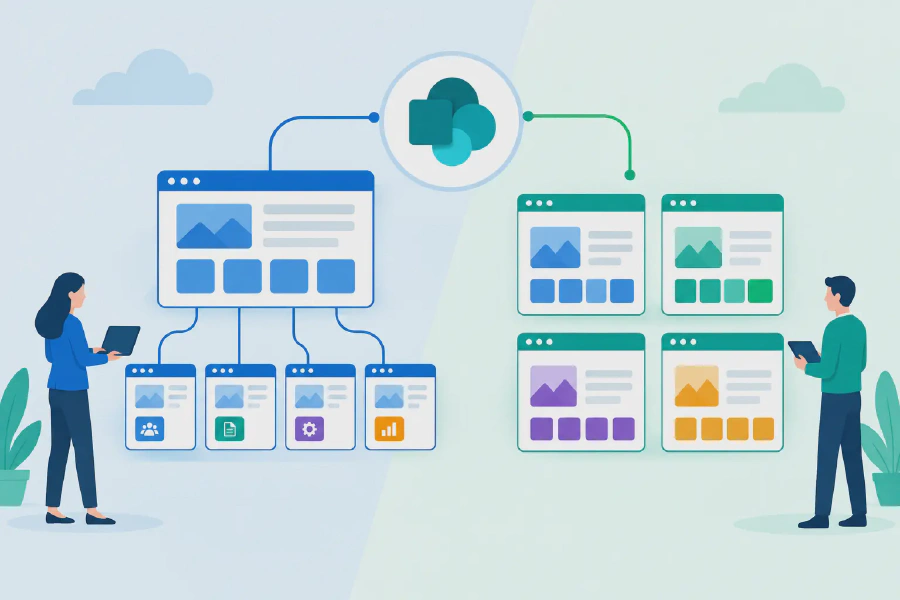
The distinction is straightforward once it is viewed through a business lens: sites are where teams do work and publish information; hubs connect related sites into a consistent experience. Getting that distinction wrong can produce an intranet that looks tidy at launch but becomes difficult to manage as the organisation grows.
SharePoint hubs versus sites: the practical difference
A SharePoint site is an individual workspace with its own purpose, content and permissions. It may support a project team, a department, a business function or an organisation-wide communications area. Each site has its own document libraries, pages, lists, owners and access settings.
A SharePoint hub is not a parent folder, a separate document repository or a replacement for sites. It is a way to associate related sites so they share navigation, branding and a broader information experience. For example, an organisation may create a People and Culture hub that brings together sites for HR policies, recruitment, learning and wellbeing.
The hub helps employees understand where they are and where to go next. A person reading a leave policy can move easily to the learning site or wellbeing resources without needing to know the underlying site URLs or organisational chart.
Most importantly, associating a site with a hub does not merge the sites. Files remain in their original libraries. Site permissions remain separate. Site owners still manage their own content, subject to the governance model set by the organisation. This independence is what makes hubs useful for scale, but it also means a hub cannot fix poor site design on its own.
What a SharePoint site should do
A well-designed site has a defined audience and a clear job to perform. If its purpose cannot be explained in one sentence, it will often become a dumping ground for documents and outdated pages.
Team sites support collaboration
Team sites are generally used for active working groups. They are well suited to project delivery, operational teams, committees and shared workspaces where staff co-author documents, manage tasks and collaborate regularly. Many are connected to Microsoft 365 Groups and Teams, which makes them a practical choice for day-to-day work.
A project site, for instance, may hold project plans, meeting notes, risk registers and working documents. Access should usually be limited to the people involved in the project, with carefully managed visitor access where needed.
Communication sites support publishing
Communication sites are designed for reaching a wider audience. They work well for policy centres, department information, executive communications, service portals and internal news. Their layouts prioritise clear messaging and easy consumption rather than intensive document collaboration.
A Finance site might publish procurement guidance, expense procedures, financial calendars and approved templates. It can be available to the whole organisation while still reserving editing rights for a small group of content owners.
The choice between a team site and communication site is not merely visual. It affects how people contribute, how permissions are managed and whether the site is built for collaboration or broad communication.
What a hub adds to the experience
A hub becomes valuable when several sites belong to the same business area or need to be experienced as one connected destination. It can provide shared navigation and consistent visual identity, helping staff recognise that related information belongs together.
Hubs also support aggregated content. News, events and highlighted content from associated sites can be surfaced at the hub level. This is particularly useful where a central function needs to share updates while allowing individual teams to maintain their own pages and documents.
Consider an organisation with separate sites for Workplace Health and Safety, Quality, Risk and Compliance. Each area needs specialist owners and different permissions. However, employees often need information across all four areas. A Governance and Compliance hub can connect those sites, provide a common navigation structure and present key announcements in one place.
That approach preserves accountability. The Risk team remains responsible for its registers and guidance, while the Quality team manages its procedures. Staff see a coherent destination rather than four isolated sites competing for attention.
Permissions are the most common misunderstanding
A hub association does not grant access to an associated site. It also does not remove access. Someone can see a navigation item but receive an access-denied message if they have not been granted permission to the destination site.
This is not a platform flaw. It is an essential security boundary, especially in healthcare, government, education and financial services environments. Sensitive HR records, commercial documents and restricted operational information should not become visible simply because a site shares a hub navigation menu.
The practical answer is to design navigation with audiences in mind. Broadly available sites can appear in hub navigation, while restricted sites should be clearly labelled, targeted to the right users or omitted from general navigation altogether. Site owners also need a defined process for reviewing membership and removing access when roles change.
When to create a new site, and when to use a hub
Create a new site when a group needs its own content lifecycle, ownership, permissions or working space. A department, programme, project or major service area usually warrants a dedicated site because its content and accountability are distinct.
Use a hub when multiple sites should feel connected for employees. The sites may serve different teams, but they share a business theme, audience or service journey. Common hub models include Corporate Services, Operations, People and Culture, Student Services, Clinical Governance or regional business units.
It depends on the organisation’s size and operating model. A smaller organisation may only need a corporate communication site plus a handful of team sites. A large enterprise may need several hubs, each supporting a set of independently managed sites. The goal is not to create a hub for every department. It is to make the structure easier to understand than the business itself.
A useful design test is to ask three questions: Who owns this information? Who needs to use it? What should they do next? If the answers differ substantially across groups, separate sites are likely appropriate. If the experience should be connected, a hub can provide the common front door.
Governance determines whether the structure lasts
SharePoint architecture often fails through uncontrolled growth rather than poor initial configuration. Teams create sites for short-term needs, names become inconsistent, inactive workspaces remain visible, and important content is copied across multiple locations. Hubs can make this sprawl look more organised, but they do not remove it.
A sustainable model defines who can request a site, who approves it, how sites are named, which templates are available and when inactive sites are reviewed. It should also establish hub ownership. Hub owners need authority to maintain navigation, approve associations and protect the purpose of the hub from becoming too broad.
Content governance matters just as much. Policies and procedures need clear owners, review dates and audience controls. Where staff must confirm they have read critical information, publishing a page is not enough. Tools such as Compliance Tracker 365 can help organisations track acknowledgement and provide visibility where action is required.
Hubs, sites and Copilot readiness
Copilot can only be useful when it works with information that is accurate, properly permissioned and easy to interpret. A poorly structured SharePoint environment increases the risk of irrelevant responses, duplicated content and staff losing confidence in the answers they receive.
A considered hub-and-site architecture supports better information management. Sites establish appropriate ownership and security boundaries. Hubs provide understandable context and consistent pathways between related information. Metadata, sensible document naming and content review processes add further value by helping people and AI tools distinguish current, approved content from obsolete material.
This does not mean every document needs extensive metadata or every site requires a complex taxonomy. Over-engineering creates its own adoption problem. Start with the information people repeatedly struggle to find, the documents that carry regulatory or operational risk, and the processes that depend on reliable content.
Build for the employee journey, not the org chart
The strongest SharePoint environments are built around how staff seek information and complete work. An employee looking for a policy does not necessarily know which corporate function owns it. A manager preparing for a new starter needs HR, IT and facilities information in a logical sequence, even though those teams maintain separate sites.
Hubs create the connected experience; sites give each team the control to manage its own information responsibly. When those roles are clear, organisations can scale their intranet without sacrificing governance or making everyday work harder.
Before creating the next site or hub, map the employee journey, confirm the content owner and decide how access will be maintained. That small amount of architectural discipline prevents a great deal of rework later and gives your Microsoft 365 environment a stronger foundation for change.